Teams interfering with MicroSip
Jump to navigation
Jump to search
MicroSip or Teams sound is interrupted when I receive phone calls.
Solution
- Fix it by going to windows' sound control panel > communications and setting the volume adjustment for calls to "do nothing".
- Modifidy your MicroSip's Settings:
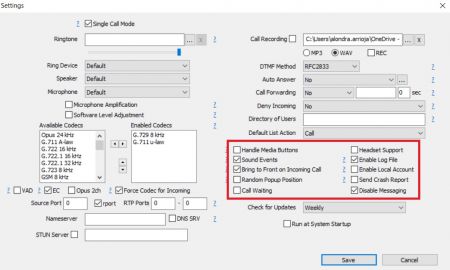
If your problem persist
Need help with your configuration?
If you are unable to complete the setup, contact us at itis.cmsupport@softtek.com. Please provide the following information to help us troubleshoot and resolve your case:
- Network Details: Your Public IPv4 address. You can find this by visiting https://checkip.amazonaws.com/.
- MicroSIP Configuration: Please provide screenshots of the following:
- Main Interface (the dialpad view).
- Settings Menu (Press Ctrl + P).
- Account Settings (Press Ctrl + M).
- Call Manager: A screenshot of the My IP Upload module.
- Issue Description: A brief summary of the error or specific behavior you are experiencing.