How to add a second extension on MicroSIP
Jump to navigation
Jump to search
Causes
Solutions
To access the configuration parameters, follow next steps:
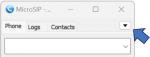
- Click the drop-down menu to access the options menu.
- Click add account and follow the manual "MicroSIP_Setup".
- Note:
If you are connecting from a country different of USA or Mexico, changed the next values: "Keep-Alive" = 9 and "Register Refresh" = 150.
If your problem persist
Need help with your configuration?
If you are unable to complete the setup, contact us at itis.cmsupport@softtek.com. Please provide the following information to help us troubleshoot and resolve your case:
- Network Details: Your Public IPv4 address. You can find this by visiting https://checkip.amazonaws.com/.
- MicroSIP Configuration: Please provide screenshots of the following:
- Main Interface (the dialpad view).
- Settings Menu (Press Ctrl + P).
- Account Settings (Press Ctrl + M).
- Call Manager: A screenshot of the My IP Upload module.
- Issue Description: A brief summary of the error or specific behavior you are experiencing.