Ring no answer in my calls status: Difference between revisions
Jump to navigation
Jump to search
Cmseditors (talk | contribs) No edit summary |
Cmseditors (talk | contribs) No edit summary |
||
| (3 intermediate revisions by the same user not shown) | |||
| Line 2: | Line 2: | ||
==Cause== | ==Cause== | ||
You have | You have an incorrect configuration in MicroSip. | ||
==Solutions== | ==Solutions== | ||
*Uncheck the box "Call Waiting" in your settings. | *Uncheck the box "Call Waiting" in your settings. | ||
*Copy the next configuration on your MicroSip settings: | |||
[[File:RingNoAnswer.png| | [[File:RingNoAnswer.png|500px|link=|caption]] | ||
{{ContacUs}} | {{ContacUs}} | ||
Latest revision as of 15:14, 25 January 2024
I have many calls with the status "ring no answer" in my agent reports.
Cause
You have an incorrect configuration in MicroSip.
Solutions
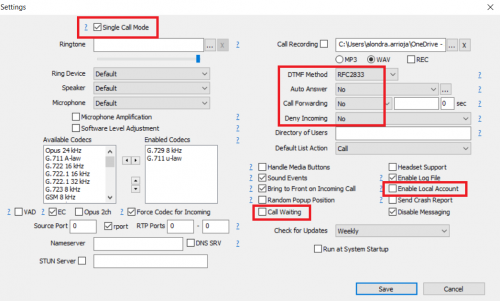
- Uncheck the box "Call Waiting" in your settings.
- Copy the next configuration on your MicroSip settings:
If your problem persist
Need help with your configuration?
If you are unable to complete the setup, contact us at itis.cmsupport@softtek.com. Please provide the following information to help us troubleshoot and resolve your case:
- Network Details: Your Public IPv4 address. You can find this by visiting https://checkip.amazonaws.com/.
- MicroSIP Configuration: Please provide screenshots of the following:
- Main Interface (the dialpad view).
- Settings Menu (Press Ctrl + P).
- Account Settings (Press Ctrl + M).
- Call Manager: A screenshot of the My IP Upload module.
- Issue Description: A brief summary of the error or specific behavior you are experiencing.