Queue Manager-Oncall: Difference between revisions
Jump to navigation
Jump to search
Cmseditors (talk | contribs) No edit summary |
Cmseditors (talk | contribs) No edit summary |
||
| Line 15: | Line 15: | ||
*A list with the queues belonging to the project will be displayed in the module. To edit agents assigned to | *A list with the queues belonging to the project will be displayed in the module. To edit agents assigned to an oncall queue, select the "'''Edit'''" option from the preferred queue. | ||
:[[File:Queue manager img3.jpg|500px|link=|caption]] | :[[File:Queue manager img3.jpg|500px|link=|caption]] | ||
| Line 23: | Line 23: | ||
*Enter the telephone number, ensuring you follow the dial pattern (format) specified by the ITIS Call Manager team. | *Enter the telephone number, ensuring you follow the dial pattern (format) specified by the ITIS Call Manager team. | ||
:[[File:SDQM-Oncall-2.jpg|500px|link=|caption]] | |||
Revision as of 16:54, 9 December 2025
The Queue Management Module empowers project leaders with full control over the resources in each service desk on-call queue. Users can assign, unassign, and modify the associated telephone numbers to ensure up-to-date and accurate on-call rotation management.
Usage requirements
- Chrome browser.
- Call Manager account (Leader profile).
- Dial Patterns
Process
- Enter with the credentials of the Call Manager

- Click on the module "SD Queue Manager"

- A list with the queues belonging to the project will be displayed in the module. To edit agents assigned to an oncall queue, select the "Edit" option from the preferred queue.

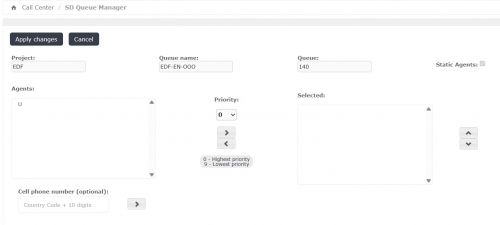
- To begin, navigate inside the module and locate the "Cell phone number" option.
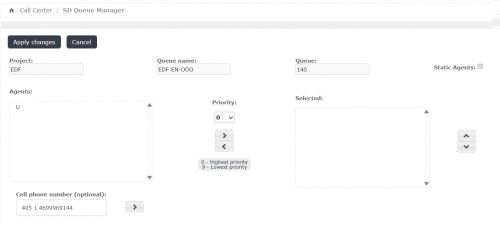
- Enter the telephone number, ensuring you follow the dial pattern (format) specified by the ITIS Call Manager team.
FAQ
- 1. How do I request my access to enter the Call Manager tool?
- Write us your request to the following DL: itis.cmsupport@softtek.com
- 2. The module does not appear or I do not have any queue assigned to the project..
- You must report it to Call Manager Support team so that they can assign you the corresponding permissions.

- 3. Not all the agents belonging to the project appear.
- Ask the Call Manager support team for help in adding the missing agent.
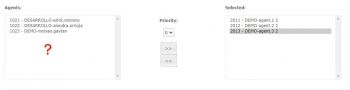
- 4. What happens if unnamed extensions appear in the queue?
- It usually occurs when requesting to unregister the extension of an agent that no longer belongs to the project. You can leave the extension to be assigned to a new agent in the future or delete it.